
Image Labels, Made Easy
Powerful Image Labeling with Labelimg
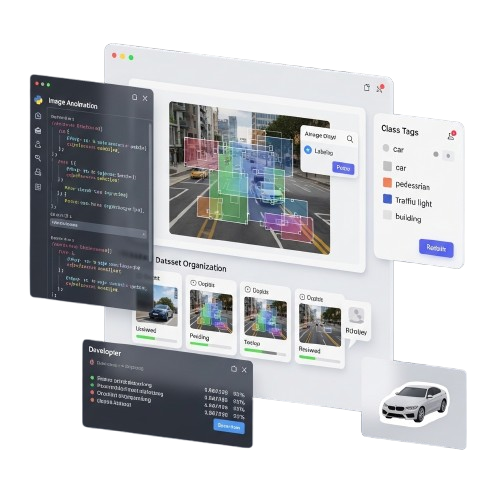
Labelimg lets you annotate images quickly and accurately for machine learning projects. Create bounding boxes, export PASCAL VOC or YOLO formats, and build high-quality datasets with speed, precision, and simplicity.
About Labelimg
At Labelimg, we believe image annotation should be simple, accurate, and accessible to everyone. Our mission is to remove complexity from dataset labeling and make high-quality image annotation effortless for developers, researchers, and AI teams worldwide.
We understand how critical precise data labeling is in today’s artificial intelligence landscape. Whether you are training computer vision models, preparing datasets for machine learning, working on object detection projects, or organizing images for research, reliable annotation tools are no longer optional — they are essential.
Our platform is designed with a strong focus on efficiency, flexibility, and ease of use. From creating accurate bounding boxes to exporting annotations in PASCAL VOC XML or YOLO formats, every feature is built to streamline your workflow. We aim to provide a solution that combines powerful functionality with a clean and intuitive user experience.
Powerful Features
Accurate Bounding Box Annotation
Create precise bounding boxes for objects with smooth controls and pixel-level accuracy to ensure high-quality image datasets for machine learning models.
PASCAL VOC XML Support
Automatically save annotations in PASCAL VOC XML format, making it easy to integrate labeled data into computer vision training workflows.
YOLO Format Compatibility
Export annotations in YOLO format for seamless use in object detection models and advanced deep learning frameworks worldwide.
Fast and Efficient Workflow
Annotate large volumes of images quickly with keyboard shortcuts, smart navigation, and an optimized interface built for productivity.
Easy-to-Use Interface
Get started in minutes with a clean and intuitive graphical interface designed for beginners and professionals alike.
Cross-Platform Support
Run Labelimg on Windows, macOS, and Linux environments with stable performance across systems.
Dataset Management
Organize, edit, and manage annotation files efficiently to maintain structured and well-labeled datasets.
Lightweight and Open Source
Benefit from a lightweight Python-based tool with full transparency and flexibility for customization.
Why Choose Labelimg?
We prioritize accuracy, simplicity, and performance.
Free and Open Source
Powerful image annotation features without licensing costs
Accurate Annotations
Precise bounding boxes for high-quality training datasets
Perfect for AI Projects
Ideal for object detection, ML training, and research
Easy to Use
Clean interface with simple tools and shortcuts
Flexible Export Options
Supports PASCAL VOC and YOLO formats for flexibility
Download Labelimg
Fast, lightweight, and reliable. Get the powerful image annotation tool for free
System Requirements: Windows 7/8/10/11 • macOS • Linux • Python 3.x • 2GB RAM • 200MB Storage
Version 1.8.6 | Open Source Package
Safe & Community-Verified
Compatible with Windows, macOS, and Linux Systems
Installation Guide
Visit the Official Source
Open your web browser and go to the official Labelimg GitHub repository or trusted source. Make sure you download the tool from the official project page to ensure security and authenticity.
Install Required Dependencies
Before installing Labelimg, ensure Python 3.x and required libraries such as PyQt are properly installed on your system. This helps the application run smoothly without errors.
Download or Clone the Repository
On the repository page, download the ZIP file or use the Git clone command to copy the project to your local machine. Wait for the files to finish downloading completely.
Run the Application
After extraction or cloning, navigate to the project directory and run the main Labelimg script using Python. The graphical interface will launch, allowing you to start annotating images immediately.
Trusted By Professionals
Trusted by developers, researchers, and AI teams worldwide for accurate, efficient, and reliable image annotation.
Guide for Labelimg

Comparing Big Serie A Teams’ Playing Styles in 2017/18 and Their Likelihood of High Scores
Read More »Frequently Asked Questions
Find clear answers to common questions about Labelimg, including installation steps, supported annotation formats, features, and workflow guidance.
Getting
What is Labelimg?
Labelimg is an open-source image annotation tool that allows users to draw bounding boxes and create labeled datasets for machine learning projects.
Is Labelimg free to use?
Yes, Labelimg is completely free and open source, allowing developers, students, and AI teams to use and customize it without licensing fees.
Which operating systems does Labelimg support?
Labelimg supports Windows, macOS, and Linux systems, ensuring flexible use across different development environments.
What annotation formats does Labelimg support?
Labelimg supports PASCAL VOC XML and YOLO formats, making it suitable for object detection and computer vision training workflows.
Is Labelimg suitable for beginners?
Yes, Labelimg offers a simple graphical interface that helps beginners annotate images easily while still supporting advanced AI projects.
Where can I download Labelimg?
You can download Labelimg from its official GitHub repository, where the latest stable version and installation instructions are available.
Features
Can I annotate multiple images quickly?
Yes, Labelimg includes keyboard shortcuts and smooth navigation tools that help users label large image datasets efficiently.
Does Labelimg support YOLO export?
Yes, Labelimg allows direct export in YOLO format, helping streamline object detection model training without extra conversion tools.
Can I edit existing annotations?
Yes, users can modify, resize, or delete bounding boxes anytime, ensuring accurate and flexible dataset preparation.
Does Labelimg require internet access?
No, Labelimg works offline once installed, allowing secure and uninterrupted image annotation on your local system.
Is Labelimg lightweight?
Yes, Labelimg is built using Python and Qt, making it lightweight and efficient even on systems with moderate hardware resources.
Can I use Labelimg for research projects?
Yes, Labelimg is widely used in academic research and AI development for creating structured datasets for experiments.
Support
Do I need Python installed to run Labelimg?
Yes, Labelimg requires Python 3.x and certain dependencies such as PyQt to function properly on your system.
Can I use Labelimg for object detection projects?
Yes, Labelimg is specifically designed for object detection tasks and helps create accurate bounding box annotations.
Are annotation files saved automatically?
Labelimg allows you to save annotation files manually, ensuring full control over dataset organization and storage.
Can I customize Labelimg?
Yes, since it is open source, developers can modify the source code to extend functionality based on project needs.
Does Labelimg support large datasets?
Yes, Labelimg can handle large image collections, allowing efficient labeling for machine learning and AI pipelines.
How can I update Labelimg?
You can update Labelimg by downloading the latest version from GitHub or pulling updates if installed via repository cloning.
Troubleshooting
Why isn’t Labelimg opening after installation?
Ensure Python 3.x and required dependencies like PyQt are installed correctly. Check your PATH and try running the script from the terminal.
Why can’t I save my annotations?
Make sure you have write permissions in the folder. Also, check that the file name is valid and Labelimg is not blocked by antivirus software.
Bounding boxes are not accurate, what should I do?
Use zoom and adjust the box corners carefully. Keyboard shortcuts can help improve precision when labeling small or complex objects.
Labelimg is running slowly, what can I do?
Close other applications to free memory. Also, avoid extremely high-resolution images or split your dataset into smaller batches.
I exported YOLO format, but it’s not working in my model.
Check that class indices match your model configuration and that bounding boxes are correctly scaled relative to image dimensions.
How do I fix missing PyQt or dependency errors?
Install missing libraries via pip, for example: pip install pyqt5 lxml. Restart Labelimg after installation to apply changes.
Labelimg – Labelimg AI dataset labeling software
LabelImg is a powerful AI dataset labeling tool for fast, accurate image annotation. Streamline workflows and boost machine learning efficiency.
Price: Free
Price Currency: $
Operating System: Windows, macOs, Linux
Application Category: Software
4.5